We asked early testers what they think. Here's what they said.
We run a small agency and needed something we could set up for clients without explaining a million settings. This does that. Monitor goes red, everyone gets pinged, we fix it. No training required.
Priya Sharma London, UK
I've tried others, even the AWS stuff. Some work fine but feel like chores. This is the first one I don't mind opening.
Mike Reeves London, UK
It works, it's fast, the UI is clean. Exactly what I needed.
Aaron James California, US
Setup took me longer to find my API endpoints than to actually configure the monitors and start seeing stats. Turned on Slack and email alerts, done. The whole thing took maybe 5 minutes and most of that was me being slow.
Matt Wilson Auckland, NZ
One of our main ecommerce sites was dropping for a few minutes at a time every day, no idea for how long. The day I set up Pinginn it logged the first incident to Slack with error data, and we had it fixed within 15 min. Our old checks missed this — sold.
Steve Morris Auckland, NZ
Been in the beta for about 2 weeks now. Haven't touched UptimeRobot since.
Tom Bradley Sydney, Australia
FAQs
Got questions? Here's what most people ask.
Is this actually free?
Yes. The Free plan is free forever — not a trial. You get 10 monitors, 5-minute checks, email alerts, and 30-day history. No credit card, no catch. Free will even get some future features.
What do I get during the beta?
Full Pro access. 50 monitors, 60-second checks, Slack alerts, API access, 90-day history, all new features as we ship — all free while we're in beta.
What happens to my monitors when the beta ends?
Your monitors stay. You can choose to switch to Free or upgrade to Pro. No surprises.
What if I have more than 10 monitors when I switch to Free?
All your monitors get paused until you delete down to 10 or fewer. Once you're at 10 or under, they automatically re-enable. Nothing gets deleted — just paused.
How often do you check endpoints?
You can set your own defaults, and per monitor intervals. Pro from 60 seconds, and Free from 5 minutes. Real requests from our servers, not cached or synthetic.
Where do checks run from?
US-based servers. Multi-region checks (US, EU, Asia) are coming soon.
Do you support Slack?
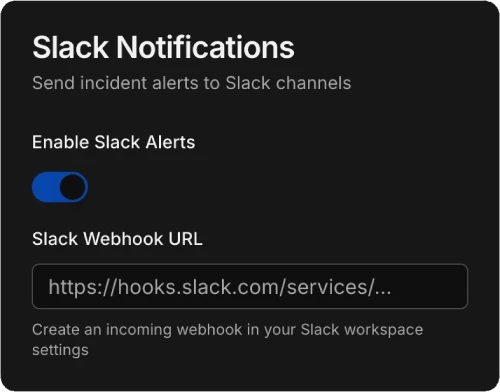
Yes, for Pro users and Teams. Add your Slack webhook URL in Settings and get instant alerts when monitors go down or recover. More integrations coming soon.
Can I monitor APIs, not just websites?
Yes, even on the Free plan. Get HEAD, GET, and POST requests. Custom headers, JSON request bodies, and keyword checking (alert if a specific word isn't in the response). More options coming soon.
How do email alerts work?
You configure your own SMTP server in Settings. Alerts send from your domain, through your mail server. We retain no email data.
Is there an API?
Yes, for Pro users and Teams. Full REST API to create, update, delete, and list monitors. Currently rate limited to 20 requests/minute.
Is my data secure?
Yes. Passwords are securely hashed, sessions are encrypted and stored server-side, and we never log response bodies or email data. We store the minimum: status codes, response times, and error messages.
Can I cancel Pro anytime?
Yes. Downgrade to Free whenever. Your monitors get paused if you have more than 10. Once you delete down to 10 or under, they re-enable. Nothing gets deleted — just paused.
Docs
Pinginn is super-easy to use, but here's some basic documentation. We'll continuously add new information as we build.